Showing posts with label Tips and Tricks. Show all posts
hack windows 7 admin password

Hello Friends..! Today in this post I am gonna tell you different methods on how to Hack Windows 7 admin Password. We all know that windows 7 has higher security features with many advantages over Windows XP. Here in this post I am going to tell you two methods of Hacking Windows 7 admin Password.

Note - This Post is for Educational Purpose only. Many a times we forget our password, so using this methods you can recover your password.

Using Windows 7 Start-Up Repair :-

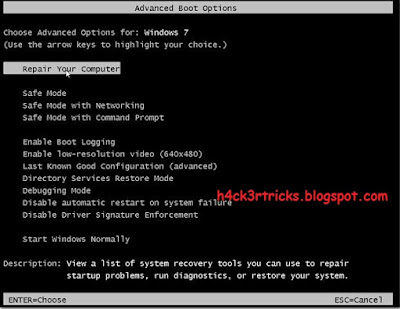
1. Turn on your PC which has Windows 7 installed. Tap F8 continuously on the boot screen to get the Windows Start-Up options.
hack windows 7 admin password

2. Now here comes the tricky part. You have to Enter into Windows 7 Start-Up Repair. So choose "Start windows normally" option and then immediately turn off the Power Source. In case of Laptops remove the Battery and in case of Desktop turn off the UPS or Power Button. Then turn on the PC again, wait for it to load. After that you will be prompted with two options in the boot screen, select the first option - "Launch Start-up Repair (Recommended)". Wait for it to load completely and scan for issues.

hack windows 7 admin password

hack windows 7 admin password

3. After 5 min, It will ask you to "Restore Defaults", select 'Cancel' option and let it continue.

hack windows 7 admin password

hack windows 7 admin password

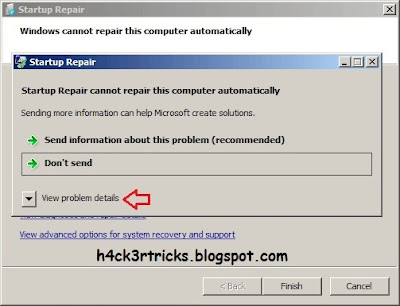
4. Now just wait for about 10-15 minutes ( time depends upon the performance of PC ). Now this is where the another tricky part comes. After about 15 minutes, an error report screen will pop-up asking you to send information or not. Click on "View Problem Details", scroll down to the bottom, Find a link stating like X:\windows\system 32\ .... and click on it.
hack windows 7 admin password

hack windows 7 admin password

5. An another Window will pop-up that looks like a notepad ( It is actually a notepad ). Click on the File Menu in the Menu Bar, then select Open. Navigate to C: Drive ( or the drive on which Windows 7 is installed ) => Windows => System32, after that change the "File Type" to 'All Files'.

6. Search for a file named "sethc.exe" ( this file is the shortcut to shortcut and sticky keys ), rename it to something else like abc, xyz etc. Search for cmd.exe, make its copy and rename the copy as 'sethc.exe'. Now it's almost done.

7. Restart the PC, On the Log In screen press Shift 5 times, until cmd opens. 

hack windows 7 admin password

8. Type "net user administrator /active:yes", this will activate the default administrator account of the PC. Change/delete/manage/reset passwords from there.

9. You can also directly change passwords from cmd, type "net user (admin/admin account name) *"


Enjoy....!!


Don't forget to subscribe to my blog for further updates..! Just click the Message Button on the below left corner of your screen and enter your e-mail and click SIGN UP :-)


If you face any problems then you can leave a comment below....we will get back to you as soon as possible. :-) :-)

view instagram pics in fill size

Hello Friends..! Well I was busy these days so I was unable to post in my blog. So today I am back with one of the rarest tricks on how can you view Instagram pics in full size. Since Instagram pics direct links are encrypted so you cannot view it directly. But as you know that in this Digital World Nothing is Impossible so you can also view the Instagram Pics in full pixels. The method and process to view an Instagram Pic in full pixels / size is given below.

Note - For the following Trick PC is required. Since the functions required for this trick are not available in Mobile Browser.

Method :-

To view Instagram Profile Picture in Full Pixels :-

1. Open the profile of person of whom you want to see his/her profile pic.
2. Right click on his/her profie pic and click on 'Open Image In New Tab'.


view instagram pics in fill size

3. Now shift to the image tab and go to its image link and find 's150x150/' and remove it from the link and press Enter.

view instagram pics in fill size

4. Yipee..!! You will now see the full size profile pic of the person or account

To view Instagram Picture in a post in Full Pixels :-

To Download image in Full Pixels / Full Size ( Long Method ) :-

1. Open the Post in a New Tab or in the Existing Tab and Press 'Ctrl+Shift+I' or right click on the page and then click on 'Inspect Element'.
2. A new window opens on the side of the browser. On it you will see small tabs like Elements, Console, Sources...From There navigate to Resources Tab.
3. There on the Left side you will a Menu. Click on the arrow beside 'Frames'. After that click on arrow beside '(www.instagram.com/)'.
4. A list appears below on the contents of the webpage. On that click on the arrow beside 'Images'.

view instagram pics in fill size

5. You will see the available images in the page. Open and check all the images, you will get the posted image full size image link below the pic. Congrats..!! You will get the full size image there.
6. Sometimes the image link is also not the full pixel image link. On the image URL and search for 's750x750/' or something value like this 'sXXXxXXX/'. Remove that part and you will get the full Pixel Image link.
7. Sometimes there are videos also posted in posts. In that case you will find '.mp4' link of the video in video list.

[ Alternative ] To Download image ( Short Method ) :-

1. Install the SaveFrom.Net plugin in your browser from below link.
   
   
2. Connect to the internet for installation of the SaveFrom.Net plugin and addd it to all your browsers.
3. After installation you will see a Green Arrow on the top left corner of the pics. Just Click it and the pictures will download directly to your PC.

view instagram pics in fill size

3. You can also download videos from Instagram similarly.

BTW you can follow me on Instagram @harshit.kumar.rajak_h4ck3r

Enjoy....!!


Don't forget to subscribe to my blog for further updates..! Just click the Message Button on the below left corner of your screen and enter your e-mail and click SIGN UP :-)


If you face any problems then you can leave a comment below....we will get back to you as soon as possible. :-) :-)


Hello Friends..! Now a days wile using multiple WiFi networks saved on your Android device so it is quite obvious to forget the password of a certain WiFi network. Many a times we forget the saved password of a WiFi network and could not remember it. For instance, your friend needs to connect to the Wi-Fi network you’re currently using on your Android device so they ask you for the security key but you just can’t remember it. What would you do..? So this article is for you..

Method :-

Requirements - 1. A Rooted Android [ See how to Root your Android Device ]
                             2. A Root Level File Explorer
                             Download -> a. ES File Explorer
                                                      b. Root Browser ( Paid => Root Browser )
                                                      c. Root Explorer (Paid)

1. Navigate to the root directory/data/misc/wifi. If your file explorer opens the SD card (/mnt/sdcard) directory by default, press back twice to open the root directory, then navigate to the mentioned path.
2. Open the document wpa_supplicant.conf. From within said file, you can view all your saved Wi-Fi access points along with their passwords. Look under the SSID (Access Point Name) of the Wi-Fi network whose password you need to view. The password is written within quotes in the line that says psk=”password”

All you now need to do is look for the needed access point and note down the password displayed under it. The above method has successfully been tested on almost all Android Devices.


Enjoy....!!


Don't forget to subscribe to my blog for further updates..! Just click the Message Button on the below left corner of your screen and enter your e-mail and click SIGN UP :-)


If you face any problems then you can leave a comment below....we will get back to you as soon as possible. :-) :-)


Hello Friends..! Many a time we encrypt our memory card by password for securing our sensitive files in it. Often we forget that password. Today I am going to sharing a trick by which you can unlock any protected memory card. This trick is very simple you just have to Download a application and use it to explore to place of password.

Unlock The Password of Locked Memory Card :-

Requirements - 1. FExplorer Application

                              [ Download Here (Symbian) ] [ Download Here (Android) ]

1. First of all, you need to download FExplorer application.
2. Insert Card Into Your Phone But Don’t Access It Through Phone
3. Run FExplorer and you have to open System Folder, or simply the path C/System.
4. Find a file called "mmcstore" and rename the file to "mmcstore.txt".
5. Now copy that file "mmcstore.txt" to your PC and open it in notepad.
6. You will find your password there.


Enjoy....!!


Don't forget to subscribe to my blog for further updates..! Just click the Message Button on the below left corner of your screen and enter your e-mail and click SIGN UP :-)


If you face any problems then you can leave a comment below....we will get back to you as soon as possible. :-) :-)


free online calls

Hello Friends..! Today I am back with one of the unique internet tricks.
"Oops…I don’t have balance right now..! Can’t call you..!" A common dialog, when you are running out of balance on phone. Don’t worry..! This post is all for you.

Methods:-

1. Go to www.call2friends.com and dial the number and click on call button.

free online calls

You can directly call to your friend for free from internet browser using the above services. The free call service is available for 3 minute (180 seconds). You can call in India, China, USA and other countries for free using the service. You can also register, pay and use for unlimited calls.

Calling browser service need you to have adobe flash player installed in your PC and you must have a decent internet speed with mic and headphone device.


Enjoy....!!


Don't forget to subscribe to my blog for further updates..! Just click the Message Button on the below left corner of your screen and enter your e-mail and click SIGN UP :-)


If you face any problems then you can leave a comment below....we will get back to you as soon as possible. :-) :-)

earn_online

Hello Friends..! So on the topic, YES! friends its true. You searched a lot about the ways we can earn some bucks online many times. You are looking for another comparatively easy way to make money..? So here you are at the right place. In this way you can earn money by just shortening URL's..! But how..?? Below is explained how you can earn just by shortening URL's.

Method :-

1. A website shorte.st which offers this trick. Click the below pic or click here and to register. This website provides almost 2$ per 1000 clicks..!


Suppose you have joined 10 Facebook groups of around 5000 members. So in total the number of members are 50k. Now if you share more than 5 links in a day in these groups; I know that not all the members are going to click your link but if at least 10% members click on them; So the number of visitors of your link are 10% of 5000 is 500 then number of users clicked on your 5 links are
                              500*10=5000 clicks per day..!
So, its estimated that you can earn minimum 5$ per day or more ( or a bit less :p )
2. After registration login to shorte.st and enter a URL on the box and click SHORTEN. 


Now share that shortened link on your Facebook groups and in different Social Networking sites to get the most traffic.


Enjoy....!!


Don't forget to subscribe to my blog for further updates..! Just click the Message Button on the below left corner of your screen and enter your e-mail and click SIGN UP :-)


If you face any problems then you can leave a comment below....we will get back to you as soon as possible. :-) :-)


Hello Friends..! Well today I am back with one of the best Hacking trick on How to hack a WhatsApp account. Seeing a keep interest of hacking WhatsApp of my visitors promoted me to post something on this topic. After a lot of research I finally came upon with two Whatsapp Hacks which really works.


Following are the two methods to hack a WhatsApp Account :-

Method 1:- Social Engineering using Bluestacks :-

NOTE:- THIS HACK ONLY WOULD WORK WITH SOMEBODY YOU KNOW OR ARE FRIENDS WITH.

Requirements – 1. A PC with Bluestacks installed. 


1. Firstly you will need to download Bluestacks and install it in your PC.
2. For this to work, a little Social Engineering is required. Using this software you would need to download and open the WhatsApp application.
3. Now enter the Phone number of your victim. WhatsApp will send a confirmation code on victims number. Now you need that code.
4. The best method to get this code off your friend is to start a conversation with him. All you have to do is somehow trick him into giving the code such that the victim hopefully gives you the code. In the case they don’t, it might be worth trying to physically get hold of their phone or try from a different tactic. Try and get it from them without making it too obvious.
People can be stupid.
This is a guaranteed method if you manage to complete the steps above.
NOTE: This method doesn’t work twice so know what you’re going to say and just go in for it. If you fail on one person, move onto the next…You will be able to intercept any messages, videos, images. Virtually anything you want off their WhatsApp..!

Method 2:- Using MAC [Media Access Control] Address

In this trick I will be telling you how you can hack WhatsApp with the help of MAC Address. In this trick you have to spoof your android phone MAC Address. Don’t be surprised..! Yes, MAC Address can be spoofed.  The attacker can use your MAC address and verification code to access your WhatsApp account.
It is easy to spoof MAC address in android but for spoofing MAC address the device must be rooted with BusyBox and Terminal App must be installed in it. Anyone can spoof their MAC address if they meet all these requirements and eventually can hack WhatsApp account of the victim.

Requirements – 1. A Rooted Smartphone [ See How to Root a Android Smartphone]
                               2. A Victim :-P

Now just follow these simple steps:-
1. Get MAC address on your android phone.

Finding MAC address on an Android Phones
1. On your phone’s home screen, click on menu, then go to setting.
2. Click on about phone. Click on the status.
3. And then view your Wi-Fi MAC address.

2. As soon the message is received, push the MAC address as well as Verifying code to your server or mail it your ID. Cheat your phone’s MAC address to the Victims address and install WhatsApp and after that type the verify code.
3. And now its done. You get full access to the victim’s WhatsApp ID. So now you can keep spying/watching your victim’s movements.
That means you and the victim is using the same ID from different devices.

Some Misconceptions About WhatsApp Hacking

Most of the people are asking for help for hacking their partner's WhatsApp and I have replied them all but lots of people were having misconceptions about whatsapp hacking so let me discuss over here.
Hacking WhatsApp is much more harder than hacking Facebook and Twitter, since Facebook and Twitter can be Hacked by Social Engineering Techniques like Phishing, Cookie Stealing and many others. When we compare to hack someones WhatsApp Account and Gain Full Access over his Account - It's nearly impossible. Since WhatsApp is a social platform which has no Login ID and password, else it is an application that can run only in mobile devices. There is no tool that can hack WhatsApp and give you a full access over someone's WhatsApp account. There are lots of Youtube Videos and websites which claim to have "WhatsApp Hack Tool" but the reality is that it can't.


Enjoy....!!


Don't forget to subscribe to my blog for further updates..! Just click the Message Button on the below left corner of your screen and enter your e-mail and click SIGN UP :-)


If you face any problems then you can leave a comment below....we will get back to you as soon as possible. :-) :-)

how to root android

Hello Friends..!! Well I m here to discuss how to root your Android Smartphone. There are many methods available to root different mobile phones and tablets but in this topic, I'm going to list the easiest, fastest and 1-click methods to root almost all Android devices and Android OS versions.


Following are the methods to root your Android Smartphone :-

METHOD 1: Root Using Mobogenie Program

Mobogenie is an all-in-one Android device management utility which allows you to install apps in one-click, backup your phone data, download ringtones, wallpapers and games to your device, etc. There is another cool feature present in this software which is 1-click rooting of any Android devices. Mobogenie allows users to root their Android mobile phones easily and quickly. You can root your Android device using Mobogenie with the help of following steps:

1. First download and install Mobogenie using following link:


2. Launch the program and connect your Android device to your PC.
3. Again if required, enable "USB debugging" option present in Developer Options in your Android device. If you can't find Developer Options, you can enable it as mentioned here.
4. Connect to the Internet.
5. Now click on "Toolkit" option present in the left-sidebar of the program and then click on 1-Click Root option and it'll start rooting the device.
It'll take a few minutes and your device will be rooted without any problem.

METHOD 2: Root Using Kingo Root Program

It is a free and easy to use program to root any Android device. I have tried it to root many android phones and it worked without any problem.

1. First of all download the software using following link:


2. After installing the program, launch it and connect your Android device to your PC.
3. If required, enable "USB debugging" option using Developer Options in your Android device. If you can't see Developer Options in your Android device, you'll need to enable it as mentioned here.
4. Once the program detects your Android device, click on "ROOT" button and it'll start rooting your Android device.
It'll take a few minutes and your device will be rooted without any problem.

METHOD 3: Root Using Framaroot Application

Framaroot is a mobile application which also allows many Android devices rooting. To use this app just follow these simple steps:

1. First download the app using following link:


2. Now copy the app's APK file to your device and install the app in your Android mobile phone.
3. Launch the app in your mobile phone and select "Install SuperSU" option.
It'll root your Android device and restart the device to take effect.

Checking Root Status of Your Android Device

After rooting your Android device, you can check whether the device was successfully rooted or not using following steps:
1. Download and install Root Checker app from Google Play Store.
2. Run the app and there you can check the root status.


NOTE: It might be possible that some rooting software or apps are not compatible with your Android mobile phone or tablet. In such cases, you should try the next available method to root your Android device. Usually Method  1 is the best method for rooting since almost all android devices are supported.

How to Unroot Android Device ?

Almost all PC software and mobile apps which allow you to root your Android device, also allow you to unroot the same device. You can also try "OTA RootKeeper" or "SuperSU" apps to unroot your Android device. If you don't find the option to unroot your device, you can flash an official stock firmware/software on your Android device to make it unrooted.


Enjoy....!!


Don't forget to subscribe to my blog for further updates..! Just click the Message Button on the below left corner of your screen and enter your e-mail and click SIGN UP :-)


If you face any problems then you can leave a comment below....we will get back to you as soon as possible. :-) :-)

how to bypass fortiguard

Hello Friends….!! Welcome Back..! By using the below method you can Bypass any WEB FILTER in schools, colleges or offices through Mobile Devices.

VPN Type: PPTP VPN
VPN Auth: Auto (Enabled)
VPN Server: euro217.vpnbook.com
                          euro214.vpnbook.com
                          us1.vpnbook.com (US VPN - optimized for fast web surfing; no p2p downloading)
                          ca1.vpnbook.com (Canada VPN - optimized for fast web surfing; no p2p downloading)
VPN Username: vpnbook
VPN Password : See Password Here


Following are the method to configure PPtP VPN in different Mobile OS :-

Configure Free PPTP VPN in Google Android Devices

1. From Andord smartphones, tablets, or set tp boxes, switch back to Home screen.
2. Touch Settings icon, touch More – VPN text bar.
3. Touch “+” button to add a new VPN profile, and fill the VPN fields as below :-
Set Name as “VPN Connection”
Set Type as PPTP
Set Server address as provided above
Checked “PPP encryption (MPPE)” option
4. Touch “Save” button to save the VPN connection.
5. Touch “VPN Connection” text bar to connect the VPN, Android will prompt the username/password information.
6. Enter VPN username and  password as provided above.
7. Touch “Connect” button to start the VPN connection, wait until VPN is connected.

Configure Free PPTP VPN in Apple iOS Devices

1. From iPhone, iPod touch or iPad, Press iPhone, iPod touch or iPad’s Home button.
2. Touch Settings icon, select VPN – Add VPN Configuration…
3. Select PPTP adding fields as :-
Description: VPN Connection
Server: ( as provided above )
Account: ( as provided above )
RSA SecurID: OFF
Password: ( as provided above )
Encryption level: Auto
Send All traffic: ON
4. Touch Save button to save the VPN configuration.
5. Slide the VPN status button from OFF to ON position, wait until VPN connected.


Enjoy....!!


Note - This post is just for educational purpose.


Don't forget to subscribe to my blog for further updates..! Just click the Message Button on the below left corner of your screen and enter your e-mail and click SIGN UP :-)


If you face any problems then you can leave a comment below....we will get back to you as soon as possible. :-) :-)